
The Pomodoro Technique is named after a kitchen timer. Francesco Cirillo used a tomato-shaped one as a student, and the method kept the name: twenty-five minutes of focus, a short break, repeat.
Most Pomodoro apps keep the name and drop the object. You get a number, a start button and a progress bar, which works fine. But part of what made the original useful was physical. You turned it, it ticked, and it rang. Setting the timer was a small act of commitment, and you could feel it in your hand.
Pomey is our attempt to bring that back. There is no start button. There's a tomato on a saucer, and you spin it.
The idea: the object is the interface
We began with one rule and kept it through every iteration: the timer itself is the control.
- Spin the fruit to set the minutes. It has weight and momentum, and it clicks into place at every minute.
- Tap to start or pause.
- Double-tap to reset the round.
- Hold to skip ahead.
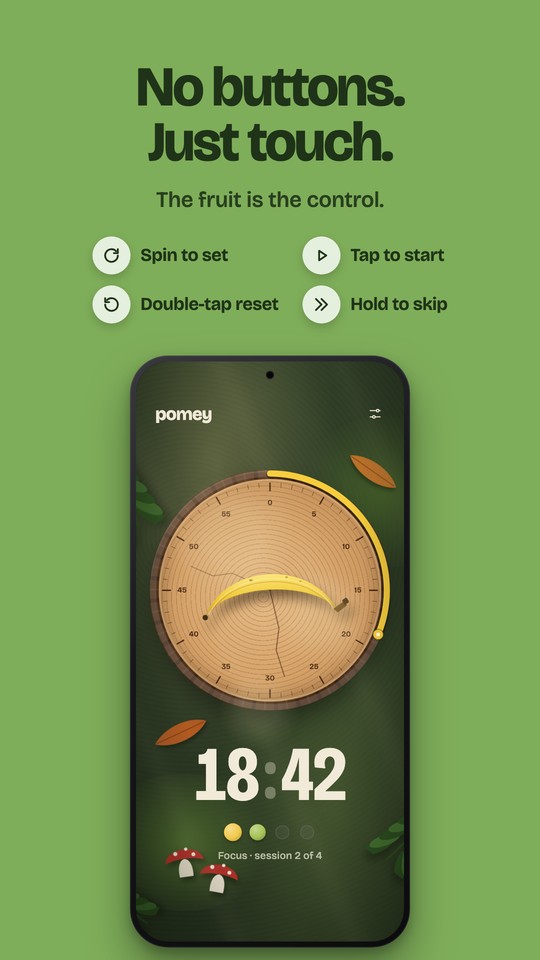
Taking buttons away creates a new problem: how do you know what just happened? Our answer is a small glass disc that appears over the fruit with a drawn icon. A play symbol that draws itself, pause bars that settle in, an arrow that spins back for a reset, chevrons that sweep for a skip. It confirms the gesture without a single word on screen.
Getting the dial to feel right
The dial took more iterations than anything else in the app. A dial that rotates when you drag it is easy to make. A dial that feels like a real object is much harder.
What made the difference:
- Momentum and friction. Let go mid-spin and it keeps turning, then slows down naturally instead of stopping dead.
- Detents. Every minute has a soft magnetic notch, paired with a haptic click and a short sound, so you can set the time without looking.
- Limits that push back. Past zero or past sixty, the dial stretches and springs back, the way a real mechanism resists.
- A tiny heartbeat. While the timer runs, the fruit nudges back with each passing second, in time with the tick.
- Fruit only. Only the fruit itself takes your finger, never the saucer or its minute ring, just as you'd grip the knob of a real timer.
None of this shows up in a screenshot, but you notice it within a few seconds of using the app.
From the first sketch to the table
Our first version was elegant and a little cold: a serif wordmark, a thin ring, and a lot of empty space. It looked like a design exercise.
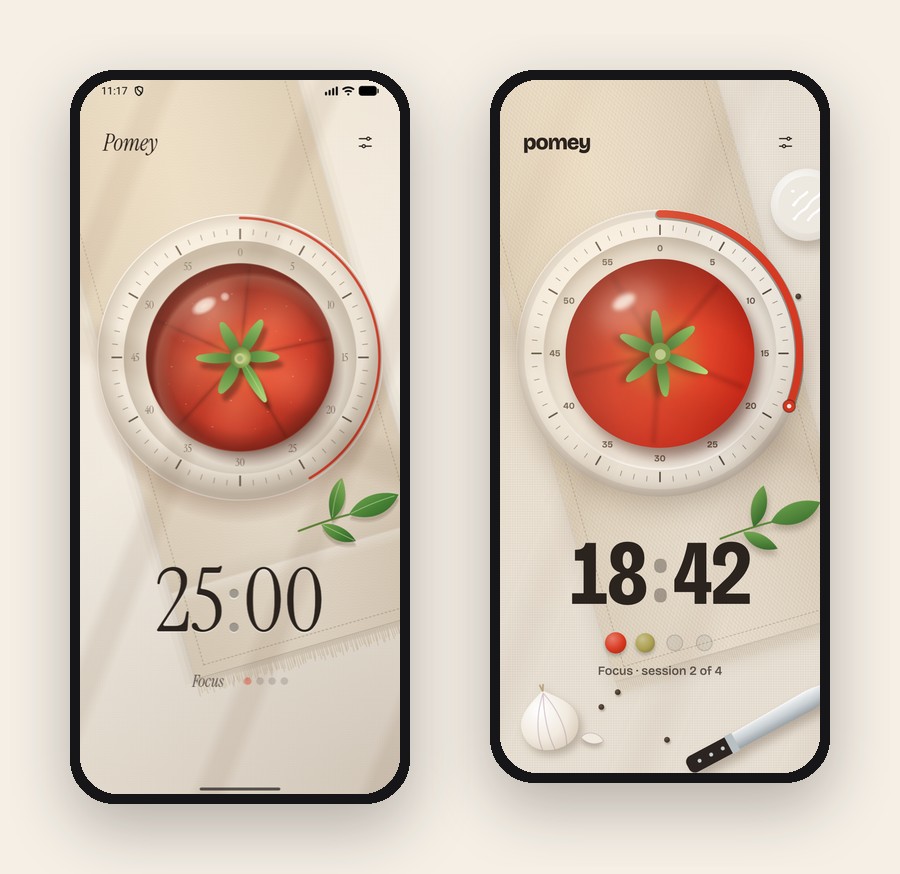
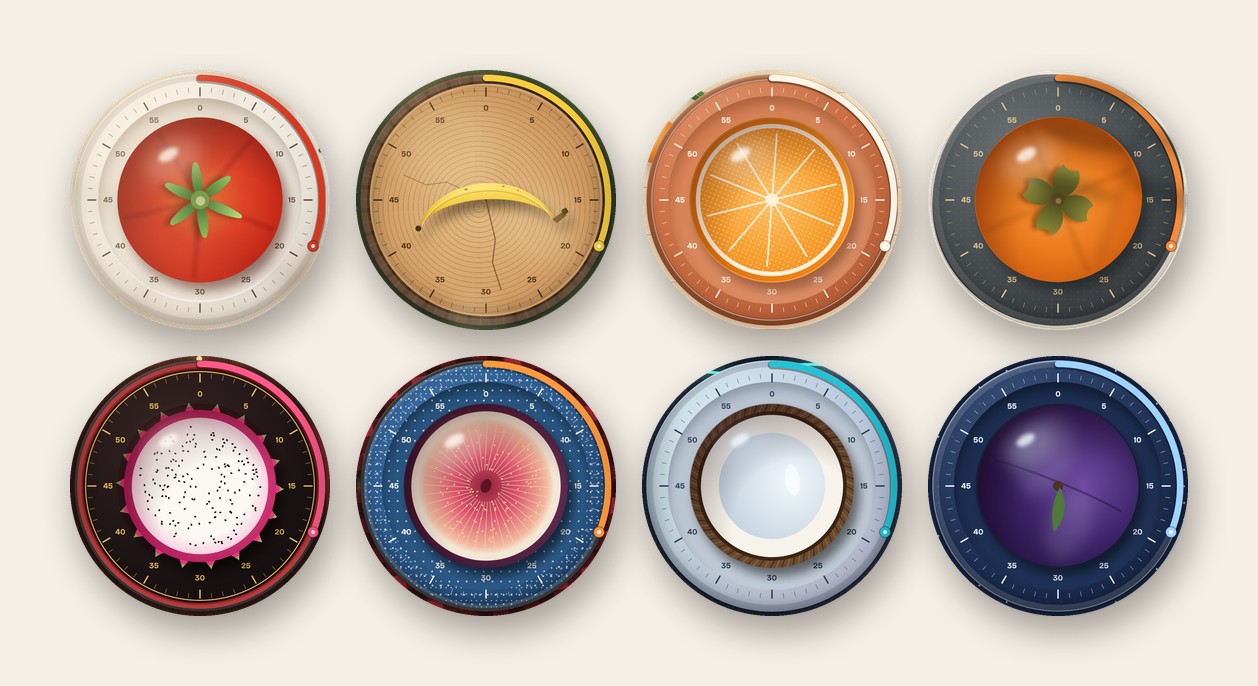
Over the next rounds we kept asking one question of every screen: does this feel like a place, or like an interface? The answer pushed us towards realism. The tomato got a gloss and a cast shadow. The saucer got printed minute marks. The table got a linen runner with a hemstitched border, a sprig of basil, a garlic bulb and a knife. The type moved to Bricolage Grotesque, which is warm and slightly eccentric, with a condensed cut for the numerals.
Everything you see in Pomey is drawn in code, every plate, leaf and grain of wood. There are no image files behind the themes. That kept the app small and let every scene scale cleanly from a compact phone to a tablet in landscape.
A world for every mood
Once the Kitchen felt right, the obvious next question was: why only a kitchen?
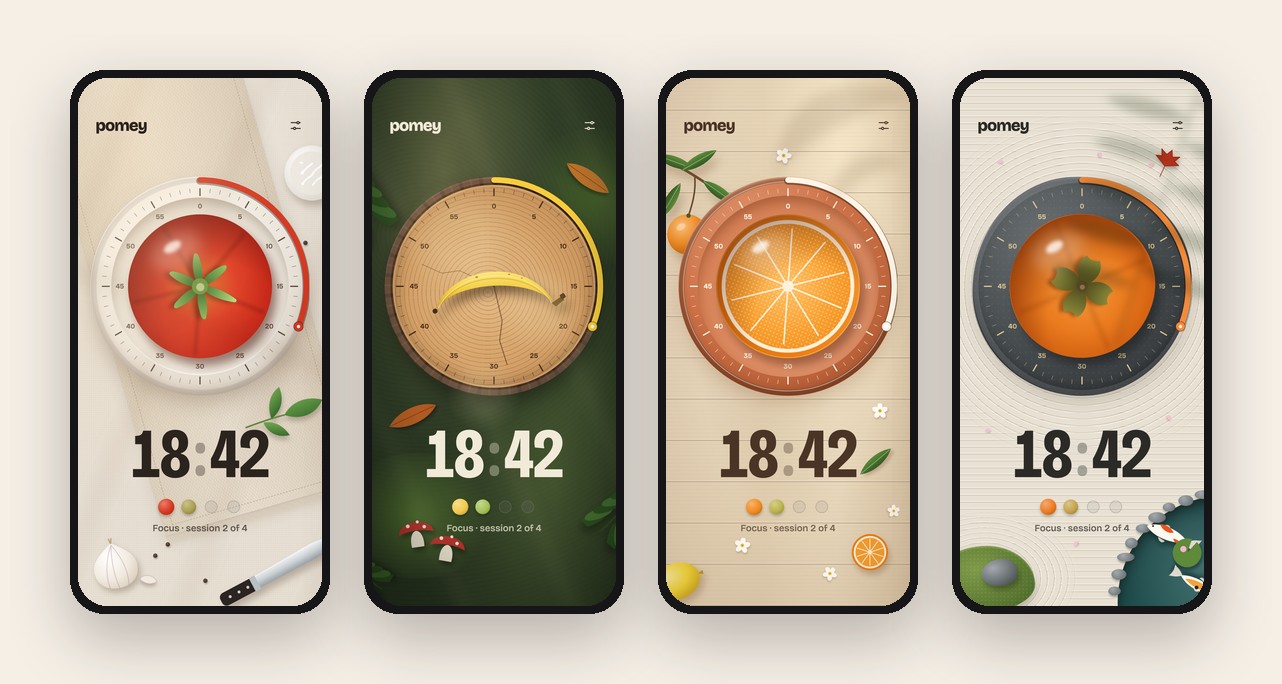
Each theme in Pomey is a small world with its own fruit, its own base and its own table. In the Forest, a banana lies across a tree-stump slice and works as the clock hand. In the Citrus Grove, half an orange sits on terracotta. The Zen Garden has a persimmon on slate, beside raked sand and a koi pond.
The night themes came later, and they're some of our favourites. Night Market puts a dragon fruit on a lacquer tray under string lights. Campfire has a fig on an enamel plate, lit by a flickering glow from a fire just out of frame. Moon Tide puts a coconut under the stars. Frost Night is a plum on smoked glass, behind frosted ferns.
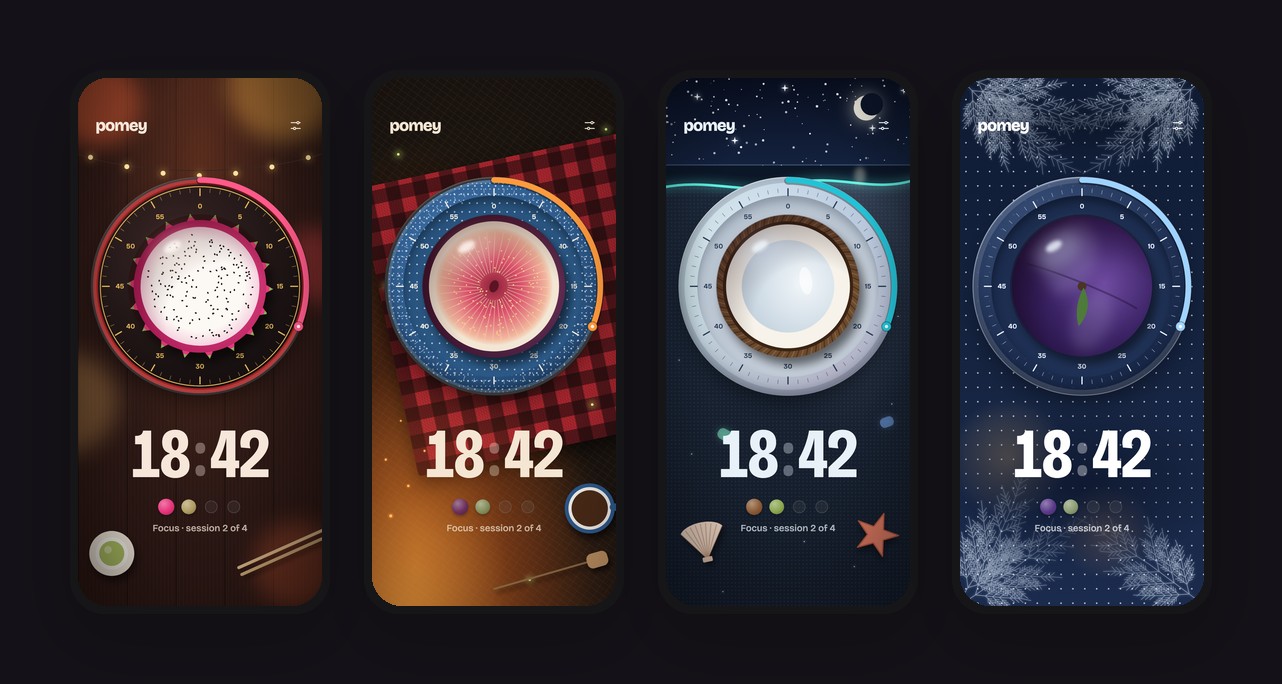
One theme didn't make it. We had a Winter Cabin with a pomegranate on an enamel plate, and it never quite worked. It wasn't clear what the scene was, and the fruit didn't read well. We replaced it with Frost Night, and we're glad we did. Being willing to drop something you've already built is a big part of how these things get good.
Every theme also sounds different. Each world has its own set of clicks, start sounds and rings. There are woodblock taps and birdsong in the Forest, a singing bowl in the Zen Garden, a strummed chord at the Campfire and jingle bells on Frost Night. We synthesised every one of them ourselves, from scratch, so each could be tuned to its world.
Two small details we care about here. Cues follow your phone's media volume, but the ring follows your alarm volume, so a muted phone still rings when the session ends. And the per-second tick only plays while you're actually looking at the timer.
Watching your sessions ripen
Under the time sits a row of small fruits, one for each focus session in a cycle. Finished sessions are ripe. The current one ripens slowly as the minutes pass. The rest are still green. A full row means you've earned a long break.
It's a small thing, but it turns a counter into something you want to complete, and it means the fruit motif isn't just decoration. It carries real information.
The timer you can leave
A focus timer that only works while it's on screen isn't much use. Pomey keeps time when you lock your phone or switch apps. A live countdown sits in your notifications with pause and skip, and the session rings on time even if the system has put the app to sleep.
Onboarding that teaches by doing
For the first-run experience, we wanted people to learn the gestures by doing them, not by reading about them.
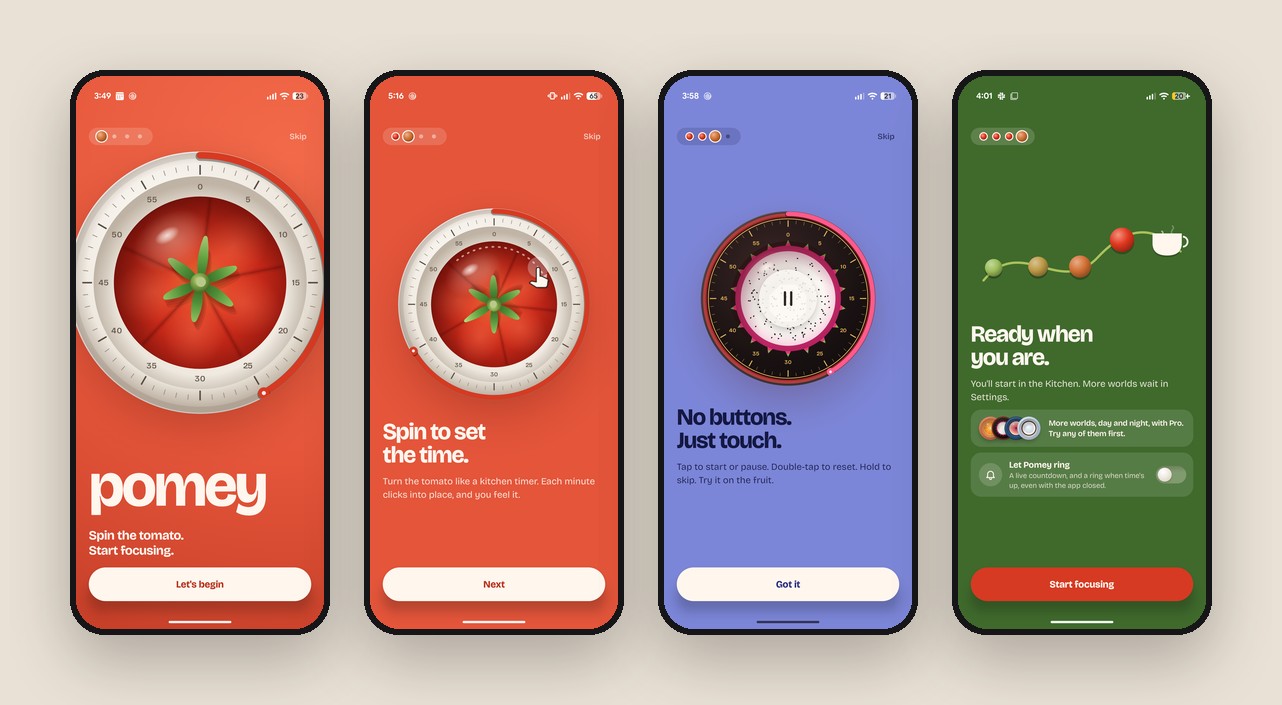
The welcome screen opens with the tomato dial spinning in, as if someone just let go of a kitchen timer. Move to the next page and that same dial shrinks into place, ready for you to spin, with a small hand showing you how. The page after that, it grows, turns once more and becomes a dragon fruit for you to tap, double-tap and hold.
On the final page, that dragon fruit flies across and lands in its own spot among the other worlds you can unlock later. The fruits along a vine ripen as the page arrives. The whole flow follows your finger, so swiping back plays it in reverse.
When you tap Start focusing, the camera starts deep inside the tomato and pulls back to reveal your table. That's where the app lives from then on.
Calm on the big screen
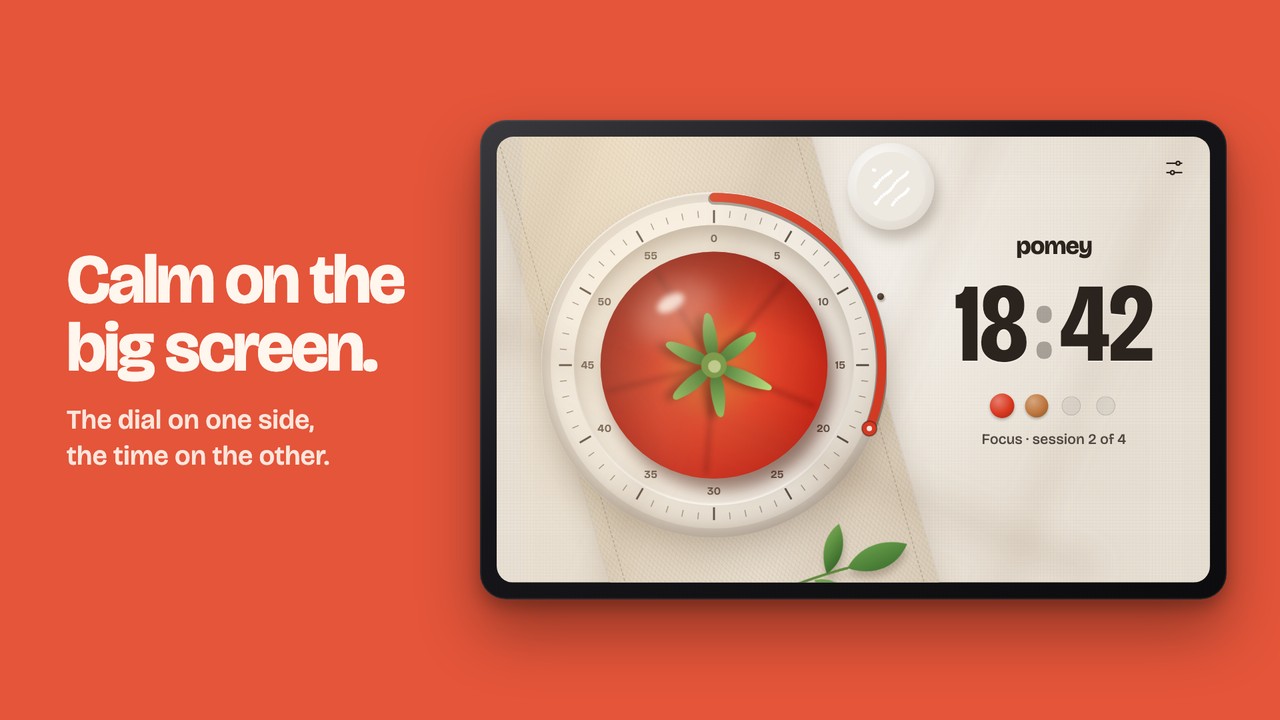
Pomey works in landscape and on tablets too. The dial sits on one side and the time on the other, and every scene redraws for the space it has.
What we took away from this one
A few lessons we'll carry into our next projects:
- One strong idea beats many features. "The object is the interface" settled dozens of decisions before we ever had to argue them.
- Feel needs its own pass. Haptics, sound and motion aren't polish to add at the end. They're how the product works, and they deserve the same attention as layout.
- Kill your darlings. Winter Cabin, a lot of early animations and several onboarding drafts were all cut. The app is better for each of them.
Try it
Pomey is out now on Google Play, for Android phones and tablets.
If you try it, we'd love to know which world you end up working in.
Pomey is designed and built by Bloomix Labs.